We've updated our file storage system, so some links may no longer work. If you need a file, just email us at support@secomea.com—we’re happy to help!

Configure custom SCIM attributes for groups in Okta

Prev Next

Configure custom SCIM attributes for groups in Okta

See the below steps for how to configure the use the path custom attributes for Groups. Refer to Configure custom SCIM attributes for users in Okta for general steps.

a) For Path, fill out the fields as shown in the screenshots below:
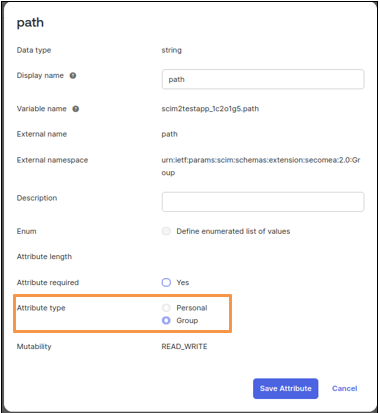
External namespace: urn:ietf:params:scim:schemas:extension:secomea:2.0:Group

Attribute type should be Group (see orange square in the screenshot).

Image