The purpose of this article is to explain the 2 ways to upgrade a SiteManager with the latest firmware.
- Through GateManager GUI.
- Through SiteManager GUI.
Through GateManager GUI.
Locate the SiteManager you wish to upgrade.
Right-click on the SiteManager and select command > upgrade
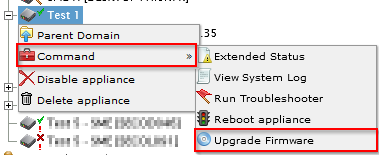
Now choose the firmware version you want to install and click the Upgrade/downgrade button.
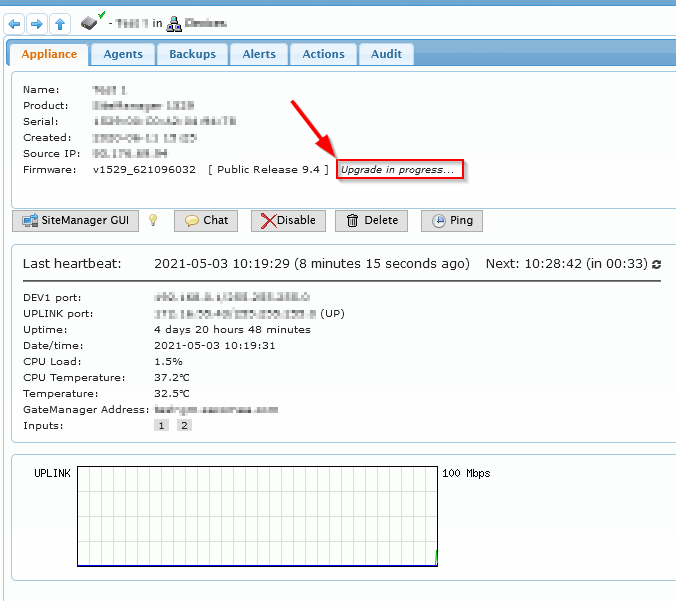
While the upgrade/downgrade has performed this status is shown.
Only the Server admin can upload firmware to the Gatemanager to make it available.
Through SiteManager GUI:
Open the SiteManager GUI.
Goto Maintenance > Upgrade.
Choose the firmware file matching the SiteManager type.
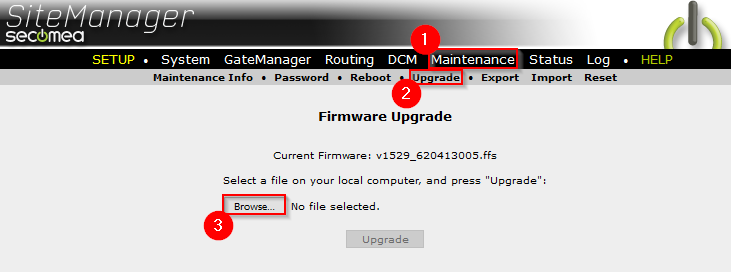
Firmware files are available on Download/Firmware: Click here.