This guide provides information on how you can manage alerts from a SiteManager using HTTP and TCP.
Learn to trigger HTTP or TCP alerts via SiteManager to send emails or text messages.
General setup
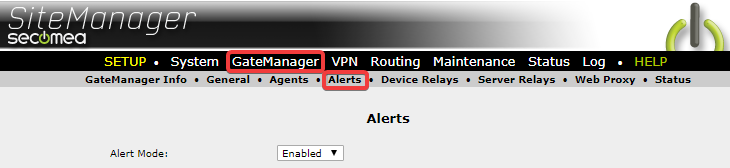
To start with, make sure Alert Mode has been set to Enabled.
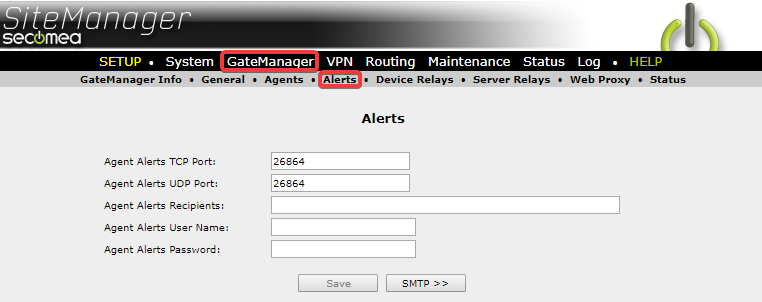
To configure SiteManager to send alerts via HTTP you will first need to configure what ports you intend to use, possible recipients, and possible username and password. (The configuration of recipients is only if your script does not include this.)
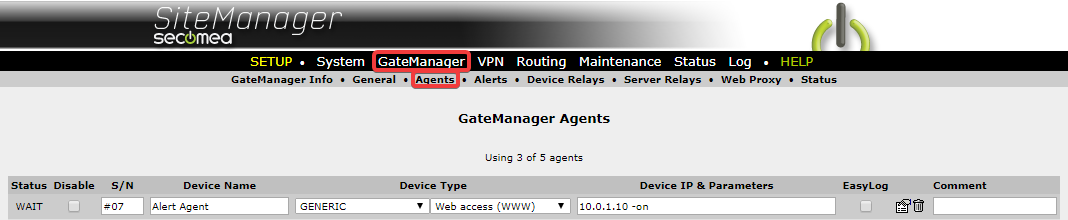
After this has been configured you will need to configure an agent to point at the device you want to send alerts to from your SiteManager. Any agent will do.
Sending Alerts with TCP requests
If you have configured your device IP correctly then you will be able to send requests to your SiteManager’s DEV port on the configured port. The syntax for these TCP requests is as follows:
/UserName/PassWord/MobileNumber/AlertText
| UserName | The username must be the same as the fields provided above. If no username has been configured then this field can be ignored. |
| PassWord | The password must be the same as the fields provided above. If no password has been configured then this field can be ignored. |
| MobileNumber | The mobile phone number intended for the message. Country code can be included but is not required. |
| AlertText | the message that is being sent to the recipient. |
Examples:
There are different ways you can configure your TCP alert, and below are just a few examples.
- /+4511223344/“Message Text 1 to be sent.”
- Here we are defining a number with a country code, +45, and a text message after this.
- /11223344/”Message Text 2 to be sent.”
- Here we are not defining a country code, so the country code of the SIM card will be used. We also define the beginning and end of the text message.
- /<alert@acme.com>/Message text 3 to be sent.
- Here we are sending an email instead of a text message. The brackets <> are necessary for the SiteManager to send an Email
- /”Message Text 4 to be sent.”
- No recipient defined in this message, the "Agent Alerts Recipients" from "GateManager > Alerts" will be used.
- /User1/pass1234/+4511223344/Message Text 5 to be sent
- Here we define both Username, Password, country code, number, and message.
In the image below you can see that we are sending a TCP request to 10.0.1.1 with the following text: /test/test/+4511223344/Message. This means that we are using the username "test" and password "test", we are sending a message to the number "11223344" with the country code "+45" and the message is "Message".
A standard TCP response is sent by SiteManager to the computer sending the TCP request.

Alternative formatting characters.
Formatting the message can be done with several different characters like: /, &, =, /t(tabulator)
The TCP request could be formatted like this:
&SMS&+4511223344&Message text 1 to be sent
=SMS=+4511223344=Message text 1 to be sent
/SMS/+4511223344/Message text 1 to be sent
This has the advantage that if you need to use one of these characters in the message text then you format the request with one of the others to avoid that character being processed as a part of the formatting.
Example: You want to include a URL in the message text
/SMS/+4511223344/http://www.dr.dk
This TCP request would be considered malformatted due to the extra // in the URL.
e.g.: & SMS +4511223344 & http://www.dr.dk
No indent the formatting character is & and therefore the // in the URL is considered as plain text
Sending Alerts with an HTTP request.
If you have configured your device IP correctly then you will be able to send requests to your SiteManager’s DEV port on the configured port. The syntax for these HTTP request are as follows:
HTTP://<address of the SiteManager>:<port>/SMS/<number>/<text message>
| <address of the SiteManager> | This is the local IP address of the SiteManager that you want to send alerts to. |
| <port> | The port defined in the Setup. |
| SMS | Static indication of alerts being sent, use "SMS" even when sending Email alerts. |
| <number> | Recipient address for the alerts. |
| <text message> | The message that is being sent to the recipient. |
Examples:
- HTTP://xxx.xxx.xxx.xxx:26864/SMS/%2B4511223344/testing_SMS
- Here we are defining the IP address, port number, a phone number with a country code, and a text message to the recipient.
- NOTE "%2B" is the HTTP equivalent of "+" - e.g. if the country code is +41 you would write %2B41
- HTTP://xxx.xxx.xxx.xxx:26864/SMS/%3Calert@acme.com%3E/testing_SMS
- Here we are defining an IP address and port number as before. But instead of a phone number, we are defining an Email address. Be aware that you still need to define <> but you will need to use the HEX values instead. ( %3C and %3E )
Below you can see an example where we are sending a text message using a web browser. If the request was sent correctly to SiteManager then SiteManager will return with a blank page as shown below.